How to Access or Create Meal Plans in the 7Daysmeal App
You can view hundreds of Kenyan Meal Plans on the 7Daysmeal app for free or create your custom meal plan.
Steps to Create a Meal Plan
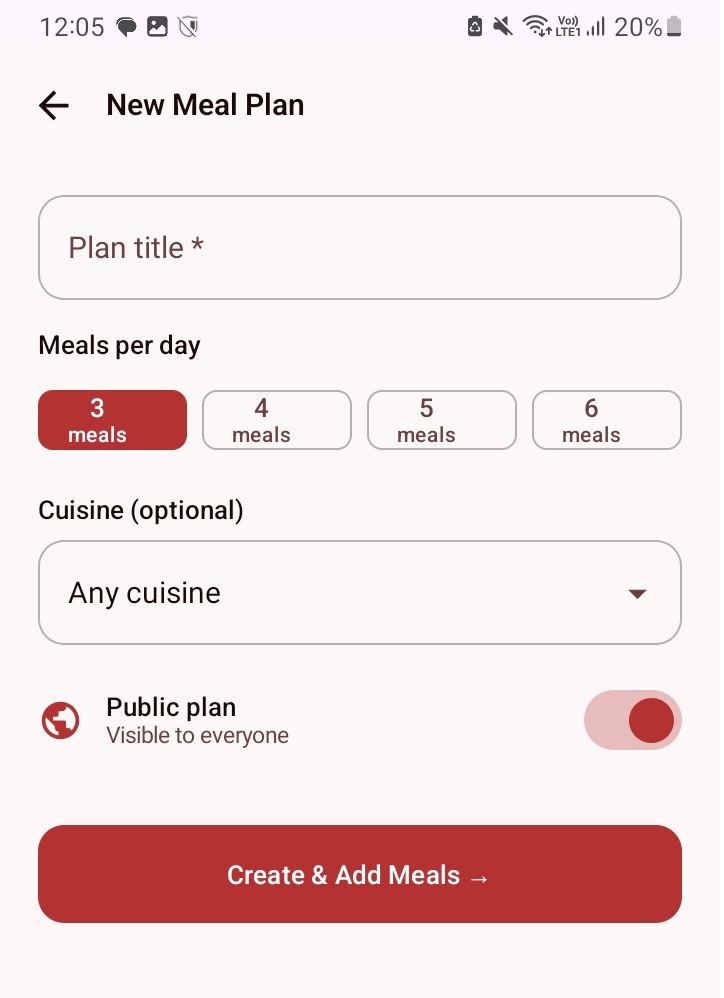
- Log in to your 7DaysMeal account
- Tap the Create or Plus (+) button in the bottom navigation
- Enter your meal plan title or name
- Choose your meal schedule:
- 3 meals per day
- 4 meals per day
- 5 meals per day
- 6 meals per day
- Select your preferred cuisine
- Choose whether the meal plan should:
- Be public (visible to other users)
- Remain private
- Tap Create
Add Meals to Your Meal Plan
After creating the meal plan, a timetable will open.
For example:
- If you selected 3 meals per day for 7 days, you will need to add 21 meals.
- To Add Meals
- Tap the Plus (+) button inside each meal box
- Search for meals from the 7DaysMeal meal directory
- Select a meal from the search results
- If the meal you want is not available:
- Scroll to the bottom of the search results
- Add your own custom meal manually
- Repeat this process until all meal spaces are filled.
- Save Your Meal Plan
When you finish adding meals:
- Tap the Save button at the top right corner
- Return to your profile
- Check Your Meal Plan Status
- If the meal plan no longer appears under Drafts, it means it is now live.
- If you selected Public, other users can see it on the app home page under Latest Meal Plans.
- If you do not see it immediately:
- Pull down on the page to refresh.
Add Meal Plans to Favorites
You can save any meal plan to your favorites for quick access later.
- Open a meal plan.
- Click the star icon.
- The meal plan will automatically be added to your Favorites list in your profile.
You can view all your favorite meal plans anytime from your profile.